I recently got the Pebble Index 01. It’s a slim aluminum ring with a single button and a mic, no screen, and no notifications. You press and hold, speak, it transcribes what you said, and sends it to the Pebble app for processing.

I’ve hooked it up using the app to Apple Reminders (todos including time triggers, and shopping lists), Apple Calendar (to add entries), and Obsidian (speak note content, it lands in my vault). It works and is low-friction. The number of times I’ve forgotten something in seconds because I didn’t have my phone on me is now zero.
But sometimes a thought is too complex for a pre-built action. Sometimes it needs actual reasoning, or tool access, or the ability to dig into something I’ve built, a script, an API, a research thread. For those moments I run Hermes Agent, an open-source autonomous agent framework on my Mac mini. It has access to my tools, my memory, my skills. It can read my knowledge base, write code, send context-aware messages, and more.
And when I’m out and about, sometimes I have a clarifying thought on how to move something forward. So the natural question: why not have the ring talk to Hermes using the secondary gesture of a double click and hold?
Hermes’ MCP server, and why it doesn’t work
Hermes can expose an MCP server, with messaging tools like conversations_list, messages_sendand events_poll. On paper that sounds like the right interface, with Pebble supports MCP servers in its cloud agent, and the idea of connecting the two felt obvious.
It doesn’t work for two reasons:
Hermes MCP is stdio-only. Pebble needs an HTTP or SSE endpoint. Bridging stdio to HTTP adds latency and complexity I don’t want for something that should feel instant.
The available tools don’t create new conversations. The MCP server lets you read and write messages on existing platform connections. It doesn’t start a new Hermes thread with full agent access.
So I went a different direction. Webhooks instead of MCP.
The architecture
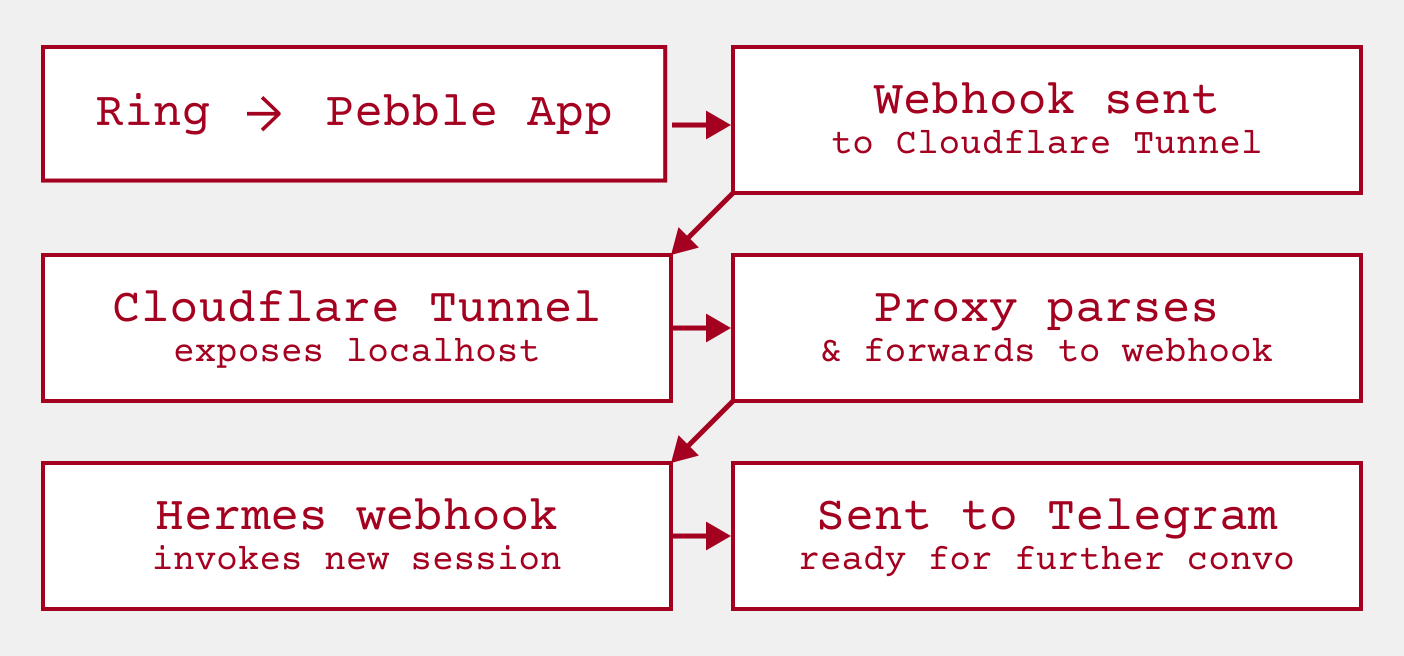
The ring sends a voice note. The Pebble app transcribes it locally and POSTs it to my tunnel URL. A proxy script on my Mac receives the multipart POST, extracts the transcription, signs an HMAC, and forwards JSON to Hermes. Hermes runs the full agent with all its tools and delivers the response to a Telegram forum topic. I reply in that topic. The conversation continues.
Simple, low latency, full agent access. Here’s how I set it up
Setting it up
Cloudflare Tunnel
My Mac mini runs at home and is exposed via a Tailnet to my other personal devices. The ring’s app can’t reach it directly.
Enter Cloudflare Tunnel. It’s a lightweight daemon that creates an outbound WebSocket connection to Cloudflare’s edge. No port forwarding, no exposed services, no firewall holes. Cloudflare handles the HTTPS termination, the routing, and the certificate management.
brew install cloudflaredcloudflared tunnel login # browser authcloudflared tunnel create pebble-index # shows tunnel idCreate a config file at ~/.cloudflared/pebble-index.yaml:
tunnel: <TUNNEL_UUID>credentials-file: /Users/{your_username}/.cloudflared/<TUNNEL_UUID>.json # use full path, not ~
ingress:  - service: http://localhost:8788  - service: http_status:404
But there’s a gotcha I hit: Cloudflare Tunnel’s ingress rules need explicit hostname matching for domain-based routing. The bare service: directive won’t route to your backend when you’re using a custom domain. I had to use:
ingress: - hostname: your-custom.domain.com service: http://localhost:8788 - service: http_status:404And I needed to write that to ~/.cloudflared/config.yaml, not the named config file. Cloudflared reads config.yaml for ingress rules, not the tunnel-specific YAML. That one confused me for a while.
DNS route:
cloudflared tunnel route dns pebble-index your-custom.domain.comThat CNAME record creates https://your-custom.domain.com, which now routes to my proxy on port 8788. DNS propagation takes 1-3 minutes.
Converting and forwarding the payload to Hermes
Pebble sends webhooks as multipart/form-data, a format designed for file uploads rather than API payloads. The fields are:
transcription— the transcribed textaudio— the raw M4A audio file (optional)recordedAt— Unix timestamp in millisecondsclient— always “ring”
Hermes expects JSON. The proxy bridges the gap.
#!/usr/bin/env python3"""Pebble Index 01 → Hermes Agent proxy.Receives Pebble's multipart/form-data webhook POST, extracts transcription,and forwards to Hermes webhook adapter with HMAC signature."""
import jsonimport sysimport reimport hmacimport hashlibimport osimport urllib.requestimport urllib.errorfrom http.server import HTTPServer, BaseHTTPRequestHandler
# Load HMAC secret from environment or config.yamlHERMES_SECRET = os.environ.get("PEBBLE_WEBHOOK_SECRET")if not HERMES_SECRET:    config_path = os.path.expanduser("~/.hermes/config.yaml")    try:        with open(config_path) as f:            content = f.read()        idx = content.index("pebble-input:")        after = content[idx:idx+500]        for line in after.split('\n'):            line = line.strip()            if line.startswith("secret:"):                val = line.split("secret:", 1)[1].strip().strip("'\"")                if val:                    HERMES_SECRET = val                    break    except Exception:        pass
    if not HERMES_SECRET:        print("ERROR: PEBBLE_WEBHOOK_SECRET env var or route secret required", file=sys.stderr)        sys.exit(1)
HERMES_URL = "http://localhost:8644/webhooks/pebble-input"
def extract_transcription(body: bytes, content_type: str) -> str:    """Extract transcription from multipart body."""    boundary_match = re.search(r'boundary=(?P<boundary>.+)', content_type)    if not boundary_match:        return ""
    boundary = boundary_match.group('boundary').strip('"')    parts = body.split(f'--{boundary}'.encode())
    for part in parts:        if b'name="transcription"' in part:            text_parts = part.split(b'\r\n\r\n', 1)            if len(text_parts) > 1:                text = text_parts[1].strip()                text = text.replace(b'--', b'').strip()                return text.decode('utf-8', errors='replace')
    return ""

def send_to_hermes(transcription: str):    """Forward transcription to Hermes webhook adapter with HMAC."""    payload = json.dumps({        "transcription": transcription,        "recordedAt": "",        "client": "ring",    }).encode("utf-8")
    signature = hmac.new(        HERMES_SECRET.encode(),        payload,        hashlib.sha256    ).hexdigest()
    req = urllib.request.Request(        HERMES_URL,        data=payload,        headers={            "Content-Type": "application/json",            "X-Hub-Signature-256": f"sha256={signature}"        },        method="POST",    )
    try:        with urllib.request.urlopen(req, timeout=10) as resp:            return json.loads(resp.read().decode())    except urllib.error.HTTPError as e:        print(f"ERROR Hermes HTTP {e.code}: {e.read().decode()}", file=sys.stderr)        return None    except Exception as e:        print(f"ERROR sending to Hermes: {e}", file=sys.stderr)        return None

class PebbleProxyHandler(BaseHTTPRequestHandler):    def do_POST(self):        self._handle_request()
    def do_GET(self):        self._respond(200, "ok")
    def _handle_request(self):        content_type = self.headers.get("Content-Type", "")        boundary = None        if "boundary=" in content_type:            for part in content_type.split(";"):                part = part.strip()                if part.startswith("boundary="):                    boundary = part.split("=", 1)[1].strip('"')                    break
        if not boundary:            self._respond(400, "Missing boundary")            return
        content_length = int(self.headers.get("Content-Length", 0))        body = self.rfile.read(content_length)
        transcription = extract_transcription(body, content_type)
        if not transcription.strip():            self._respond(200, "ok")            return
        result = send_to_hermes(transcription)        if result:            print(f"Hermes response: {result}")            self._respond(200, "ok:forwarded_to_hermes")        else:            self._respond(502, "hermes_delivery_failed")
    def _respond(self, status, message):        self.send_response(status)        self.send_header("Content-Type", "text/plain")        self.end_headers()        self.wfile.write(message.encode())
    def log_message(self, format, *args):        pass

def main():    port = int(sys.argv[1]) if len(sys.argv) > 1 else 8788    print(f"Pebble proxy listening on port {port}...")    server = HTTPServer(("0.0.0.0", port), PebbleProxyHandler)    server.serve_forever()

if __name__ == "__main__":    main()
The proxy reads the HMAC secret from the config file or an environment variable, starts listening on port 8788, and when it receives a multipart POST it extracts the transcription, signs the payload, and forwards JSON to Hermes. No dependencies, pure stdlib.
The Hermes route
Hermes webhooks work by defining routes in config.yaml. Each route matches an incoming POST, runs the agent, and delivers the response.
platforms: webhook: enabled: true extra: port: 8644 secret: pebble_<your-secret> routes: pebble-input: prompt: "Index 01 Ring: {transcription}" deliver: telegram deliver_extra: chat_id: "-1004336449473" message_thread_id: "2" secret: pebble_<your-secret>A few notes on the configuration:
promptuses dot-notation to access the JSON payload.{transcription}pulls thetranscriptionfield from the incoming JSON.deliver: telegramsends the response to Telegram.deliver_extrawithchat_idandmessage_thread_idroutes to a specific forum topic in the group I use to interact with my agents. Replace both values with your own.secretis an HMAC key for request authentication.
You might wonder why I didn’t use hermes webhook subscribe pebble-input --deliver telegram, the CLI way to create a webhook subscription. The CLI has a routing bug: --deliver telegram on a webhook subscription sends the agent’s response back to the caller, not to the target Telegram chat. Routes defined directly in config.yaml don’t have this problem.
Pebble app configuration
In the Pebble app:
- Go to Index → Settings
- Set Double-click & hold to “Webhook only”
- Set the Webhook URL to
https://your-custom.domain.com(your domain, no path appended) - Set What to send to “Transcription”
Double press the ring button, hold, speak. Within 3-5 seconds your thought arrives in Telegram’s Index 01 forum topic. Hermes runs the agent with full tool access and responds. You reply in the same topic to continue the conversation.
The auto-start services
Both the proxy and the tunnel run as macOS launchd services. They survive reboots automatically.
Proxy plist: ~/Library/LaunchAgents/com.pebble.proxy.plist
<?xml version="1.0" encoding="UTF-8"?><!DOCTYPE plist PUBLIC "-//Apple//DTD PLIST 1.0//EN" "http://www.apple.com/DTDs/PropertyList-1.0.dtd"><plist version="1.0"><dict> <key>Label</key> <string>com.pebble.proxy</string> <key>ProgramArguments</key> <array> <string>/opt/homebrew/Cellar/python@3.14/3.14.6/Frameworks/Python.framework/Versions/3.14/Resources/Python.app/Contents/MacOS/Python</string> <string>/Users/kevin/.hermes/scripts/pebble-proxy.py</string> <string>8788</string> </array> <key>EnvironmentVariables</key> <dict> <key>HOME</key> <string>/Users/kevin</string> <key>PATH</key> <string>/opt/homebrew/Cellar/python@3.14/3.14.6/Frameworks/Python.framework/Versions/3.14/Resources/Python.app/Contents/MacOS:/opt/homebrew/bin:/usr/local/bin:/usr/bin:/bin</string> </dict> <key>RunAtLoad</key> <true/> <key>KeepAlive</key> <true/> <key>StandardOutPath</key> <string>/tmp/pebble-proxy.log</string> <key>StandardErrorPath</key> <string>/tmp/pebble-proxy-error.log</string></dict></plist>Tunnel wrapper: ~/.hermes/scripts/pebble-tunnel-start.sh
#!/bin/bashexec /opt/homebrew/bin/cloudflared tunnel run pebble-indexTunnel plist: ~/Library/LaunchAgents/com.pebble.tunnel.plist
<?xml version="1.0" encoding="UTF-8"?><!DOCTYPE plist PUBLIC "-//Apple//DTD PLIST 1.0//EN" "http://www.apple.com/DTDs/PropertyList-1.0.dtd"><plist version="1.0"><dict> <key>Label</key> <string>com.pebble.tunnel</string> <key>ProgramArguments</key> <array> <string>/bin/bash</string> <string>-c</string> <string>/Users/kevin/.hermes/scripts/pebble-tunnel-start.sh</string> </array> <key>RunAtLoad</key> <true/> <key>KeepAlive</key> <true/> <key>StandardOutPath</key> <string>/tmp/pebble-tunnel.log</string> <key>StandardErrorPath</key> <string>/tmp/pebble-tunnel-error.log</string></dict></plist>Load them:
launchctl load ~/Library/LaunchAgents/com.pebble.proxy.plistlaunchctl load ~/Library/LaunchAgents/com.pebble.tunnel.plistBoth will start automatically on boot. The proxy catches Pebble webhooks, routes them to Hermes, and the agent runs with full access to everything: browsing, code execution, file manipulation, calendar, reminders, API calls.
Why tihs matters
The Pebble ring captures thoughts with almost zero friction. Simple thoughts route to Apple Reminders for tracking, medium ones to Obsidian for reference, and complex thoughts to Hermes where they actually get processed.
Thoughts like “research the best way to batch-process the PDFs in my Google Drive” or “write a script to monitor my Apify accounts sending” need more than a todo item. They need reasoning and tool access, and that’s what closing the loop to Hermes gives you.
By connecting the ring to Hermes, I’ve closed the loop. Simple thoughts go to Apple Reminders. Medium thoughts go to Obsidian. Complex thoughts go to Hermes. The ring stays the input method, the processing is context-aware.
The pipeline is:
Ring → Speak → Transcribe → Proxy → Hermes → Telegram → Reply